

Comments
Discuss a blueprint in place, so the reasoning stays with the artifact.
Review is where a blueprint stops being a proposal and becomes a decision the team owns. Anchoring that discussion to the section it concerns is what keeps feedback on the Target State from getting tangled with feedback on the Implementation Plan. For the artifact being reviewed, see Blueprints.
Comments let you leave feedback directly on a blueprint, anchored to the specific section it relates to. Instead of discussing a design over a separate thread or doc, your team can raise questions, flag concerns, and align on changes right where the relevant detail lives, keeping the conversation tied to the architecture it is about.
Adding a comment
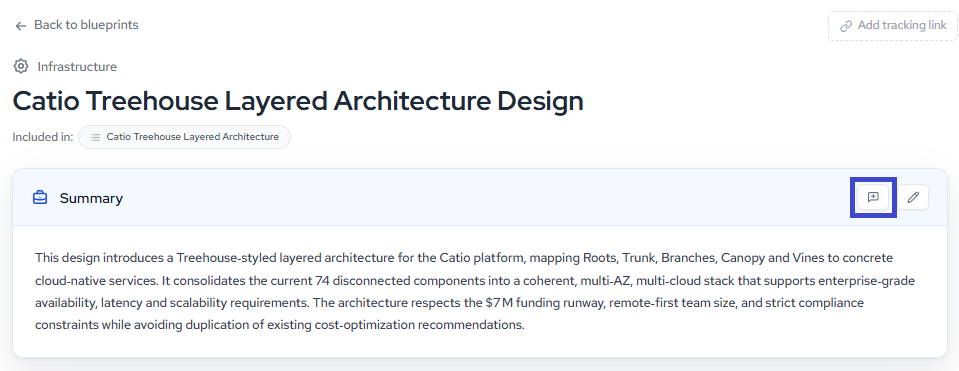
Each section of a blueprint has its own comment control. Open a blueprint and hover over the section you want to comment on (Summary, Target State, Gap Analysis, and so on), then click the comment icon in the section header.
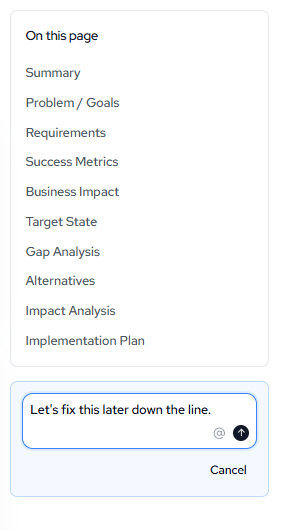
A comment box appears for that section. Type your comment, and use the @ control to mention a teammate and pull them into the conversation. Click the send button to post, or Cancel to discard.
Working with comments
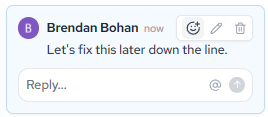
Once a comment is posted, it stays attached to its section along with the author and timestamp. From there you can:
- React to a comment to acknowledge it without adding a full reply.
- Edit your own comment to refine or correct it.
- Delete a comment once it is resolved or no longer relevant.
- Reply to continue the thread, with the same @ mention support so the right people stay looped in.
Because comments are scoped to individual sections, feedback stays organized as a blueprint evolves: questions about the target state stay on Target State, gaps stay on Gap Analysis, and reviewers can move through a design section by section without losing the thread.
For more on reviewing and evaluating blueprints, see Interpreting and Acting on Blueprints.
Updated about 1 month ago