

Focus
Narrow what Catio optimizes for when it generates blueprints.
Scope decides where Catio looks. Focus decides what it optimizes for while it is there. Narrowing is worth doing when your team has one clear objective for the cycle, because a blueprint set that answers every question at once is harder to act on than one that answers the question you actually have. For where Catio looks, see Scope.
Focus lets you narrow the type of blueprints Catio generates by selecting one or more benefit categories. This ensures that the results align with a specific business outcome rather than covering all possible improvements.
How Focus Works
When you click the Focus selector, you can choose All or select one or more of six benefit categories to refine what Catio prioritizes during analysis.
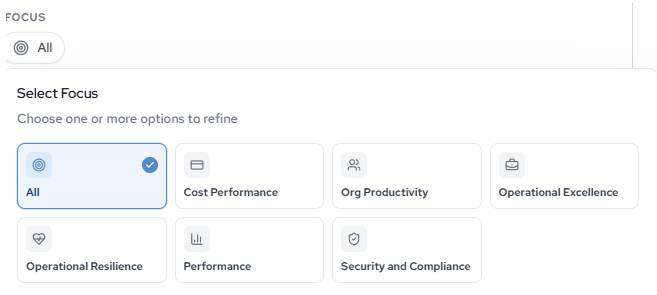
The available focus categories are:
- Cost Performance: Surface opportunities to reduce spend, eliminate waste, or consolidate underutilized resources.
- Org Productivity: Identify changes that reduce manual effort, automate workflows, or streamline team operations.
- Operational Excellence: Find improvements to deployment practices, change management, and operational maturity.
- Operational Resilience: Strengthen fault tolerance, disaster recovery, and high availability across your infrastructure.
- Performance: Target latency, throughput, and resource efficiency improvements.
- Security and Compliance: Address gaps in access controls, encryption, network security, and regulatory alignment.
You can select multiple categories in a single generation cycle. Selecting All applies no filter and returns blueprints across every benefit category.
Focus applies at generation time. To filter blueprints that already exist, use the Category filter on the Blueprints list, which offers eight options rather than six.
When to Narrow Your Focus
Narrowing focus is useful when your team has a clear objective for the current planning cycle. For example, if your organization is preparing for a compliance audit, selecting Security and Compliance will prioritize those findings over cost or performance improvements. If you are running a cost reduction initiative, selecting Cost Performance ensures the results are directly actionable for that goal.
Updated about 2 months ago