

Scope
Decide which part of your architecture Catio reasons about.
Scope decides what Catio is allowed to look at when it reasons. Set it too wide and you get findings that are individually correct and collectively irrelevant. Set it too narrow and you miss the dependency that made the change hard. A saved view is how you make a specific boundary reusable as a scope target.
Scope defines the boundary of your architecture that Catio analyzes when generating blueprints or creating a plan. Setting the right scope ensures that results are relevant to the area you are focused on rather than spanning your entire environment.
How Scope Works
When you click the Scope selector, you can choose between Full Architecture or a specific view you have created in Stacks.
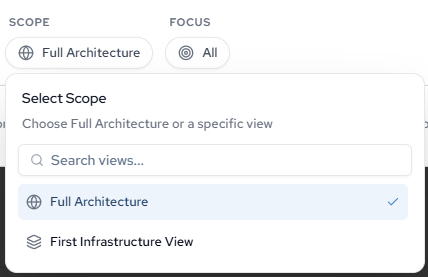
- Full Architecture: Analyzes all infrastructure and services across your entire workspace. Use this when you want a broad assessment or are early in your planning process.
- Specific View: Limits analysis to the resources and relationships captured in a Stacks view. Use this when you want blueprints scoped to a particular team, product, region, or service boundary.
When to Use a Specific Scope
Scoping to a specific view is useful when you already know which part of your architecture you want to improve. For example, if you have a Stacks view filtered to a single product's resources, scoping to that view will produce blueprints that only address those components rather than surfacing unrelated findings from other parts of your environment.
If you are unsure where to start, use Full Architecture and then narrow your focus in subsequent generation cycles as you identify priority areas.
Updated about 1 month ago