

Surfacing and Acting on Blueprints through the Catio MCP
Find, evaluate, refine, and implement Blueprints from inside your AI coding client, without the handoff where constraints get dropped.
This workflow uses the Catio MCP, Blueprints, and Workspace Context. Start with those if any is unfamiliar.
This guide covers the developer-side workflow for Blueprints: how to find them, read them critically, decide whether to act, and carry them into implementation, entirely from inside your AI coding client over the Catio MCP.
It is written for software engineers, staff and platform engineers, architects, and teams adopting the Catio MCP. It assumes you are comfortable with Git, MCP, and AI coding assistants. It does not assume you know what a Blueprint is or how Recommendations differ from Designs. Those are explained here as you need them.
This is not a tour of the Catio app. For the in-app experience, see Blueprints and How to Best Utilize Blueprints. This guide is the in-editor angle: the same artifacts, consumed and acted on through the MCP.
Prerequisites: a Catio account with at least one workspace containing data, and the Catio MCP server connected and authenticated in your client. If you have not connected it yet, start with MCP Setup and Query Your Architecture and Find Blueprints with the Catio MCP.
What a Blueprint is
A Blueprint is Catio's structured architecture artifact. It defines a change from a current state to a target state, and it carries four things with it: the reasoning behind the change, the business and engineering impact, the gap between where you are and where you should be, and an implementation path to get there.
Blueprints exist because architecture decisions need a system of record in the same way code does. A pull request tells you what changed in one repository. A Blueprint tells you what should change across the system, why, and what it is worth. Your coding assistant is very good at the first and has no visibility into the second unless something gives it that visibility. The MCP is that something.
Two properties matter for this workflow:
- A Blueprint is grounded, not generic. It is generated against your live architecture inventory and your Workspace Context: your standards, constraints, and business objectives.
- A Blueprint is built to be handed off. Target state, requirements, and a phased implementation plan are all present because the artifact is designed to be consumed by an engineer or an execution agent, not just read.
Recommendations and Designs
Blueprint is the umbrella. Recommendation and Design are its two subtypes. The difference is posture, not structure: whether you have already committed to doing the work.
| Recommendation | Design | |
|---|---|---|
| Origin | System-identified improvement opportunity | User-initiated or user-committed change request |
| Posture | Persuasive: leads with the case for action | Specifying: leads with the target solution |
| Leads with | The gap, the risk, the ROI | Requirements, target architecture, trade-offs |
| You are deciding | Whether this is worth doing | How to execute something already decided |
MCP subtype filter | recommendation | design |
Both subtypes share the same data model and the same MCP tools. Where this guide says "Blueprint" the behavior applies to both.
One naming detail to expect in your client: some MCP tools are named for the older taxonomy. search_recommendations searches all Blueprints, and get_recommendation fetches either subtype. Read "recommendation" in a tool name as "Blueprint."
For each subtype in depth, see Recommendations and Designs.
Why work Blueprints through the MCP
You could open the app, and sometimes you should. The reason to work Blueprints in the editor comes down to three things.
Context stays loaded. The moment you leave your session to read a Blueprint in a browser, the architectural reasoning lives in your head and not in your assistant's context window. Pull it over the MCP and the target state, the constraints, and the implementation plan are all available to the model that is about to write the code.
The Blueprint becomes queryable rather than readable. In the app you read a section. In your client you can ask "which phases touch the notifications module" or "reconcile the target state against what is actually in this repo." That second question is the one that catches drift, and it is only possible where the Blueprint and the code are in the same context.
The handoff has no gap. The costly failure in AI-assisted development is rarely bad code. It is locally correct code that ignores a system-level constraint the organization already settled. Evaluating and implementing in one session removes the transcription step where that constraint gets dropped.
What the app is still better at: browsing a large Blueprint list visually, comparing ROI across many candidates side by side, and organizing Blueprints into Plans. Use both. The Blueprints module remains the system of record.
The workflow
flowchart TD
    A["Task or ticket lands"] --> B["Establish session context<br/>get_workspace_info"]
    B --> C["Discover Blueprints<br/>search_recommendations"]
    C -->|"match found"| D["Pull full content<br/>get_recommendation"]
    C -->|"no match"| E["Generate a Blueprint<br/>ask_archie or generate_blueprint_list"]
    E --> D
    D --> F["Review business case"]
    D --> G["Review engineering case"]
    D --> H["Review implementation plan"]
    F --> I{"Act now?"}
    G --> I
    H --> I
    I -->|"yes"| J["Map Blueprint to repo"]
    I -->|"refine first"| K["edit_blueprint_with_archie<br/>then update_blueprint"]
    I -->|"later"| L["Add to a Plan in the app"]
    K --> D
    J --> M["Implement, referencing the<br/>Blueprint throughout"]
    M --> N["Pull request"]
Each step below explains why it exists, when you would run it, and what it produces.
Step 1: Establish session context
Why: the MCP is workspace-scoped. Your workspace was fixed at login and is enforced server-side, so every result you get back is bounded by it. Confirming which workspace you are in takes one call and prevents the most common source of confusing empty results.
When: first call of any Blueprint session.
Tell me about my Catio session.This calls get_workspace_info and returns the workspace name, description, tags, and tenant ID.
If you are about to evaluate a Blueprint rather than just list them, pull the Context in the same breath:
Show me the workspace context for this workspace.get_workspace_context returns a pre-rendered summary of the requirements in effect, built for briefing an agent before architecture work. This is the material a Blueprint was generated against. Loading it first means that when you read a Blueprint's reasoning, your assistant can tell you which organizational constraint each decision traces back to.
Step 2: Discover the Blueprint
Why: before you design anything, find out whether Catio already has. A Blueprint that already exists carries a business case, a gap analysis, and a plan that someone can be held to. Rebuilding that from scratch in a chat window throws all of it away.
When: a ticket lands, a sprint starts, or you are about to make an architecturally significant change.
Search my Blueprints for anything related to notifications.This calls search_recommendations and returns summaries: ID, title, status, category, architecture domains, and benefit categories.
Search on nouns, not descriptions. The free-text
querymatches keywords in a Blueprint's title and content. It is not a semantic search. A conceptual phrase such asmigrate monolith to microservicescan return nothing even when a matching Blueprint exists. Reduce your intent to the primary domain noun (notification,checkout,EC2,auth) and search on that. Broaden, then narrow.
Narrowing the list
The same dimensions you filter on in the app are available as structured filters on the tool. Combining them is how you turn a long list into a shortlist:
| Filter | Use it to |
|---|---|
subtype (recommendation, design) | Separate "should we?" from "how do we?" |
status (NEW, PINNED, MET, DISMISSED, SUPERSEDED) | Exclude work already done or ruled out |
domain | Scope to your area of ownership. See Architecture Domains |
benefit | Align to the objective you are being measured on. See Focus |
category | Narrow by subject area. Values are listed on Tools |
sort_by, sort_order | Rank the shortlist, for example by ROI or complexity |
Useful combinations in practice:
Show me NEW Blueprints in the Infrastructure domain, sorted by ROI.What are my simplest Blueprints to implement? Sort by complexity, lowest first.Show me design Blueprints only, most recently modified first.
The app's list view is the same data your search returns. Title, Status, Main Benefit, Type, and ROI map onto the fields in a search_recommendations summary, which is a useful way to build intuition for what the tool is giving you.
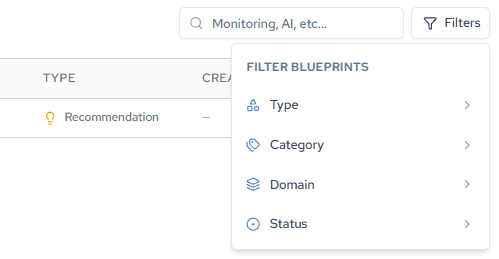
Working through a batch rather than a single Blueprint
Blueprints are often generated in batches, for example from a single goal or PRD.
What Blueprint batches have been generated in this workspace?list_recommendation_lists returns those generation batches with their status, and get_recommendation_list_status checks a specific one. Reach for these when your task is "work through everything that came out of last week's generation" rather than "look at one Blueprint." To put a batch into an executable order, organize it into a Plan in the app.
Step 3: Pull the full Blueprint
Why: search returns a summary. Summaries are for triage and nothing else. Every judgment in the rest of this guide depends on the full content.
When: as soon as a candidate survives triage.
Get Blueprint <id> and give me the target state, the gap analysis, and the
implementation plan.
get_recommendation returns the complete artifact with all of its sections.
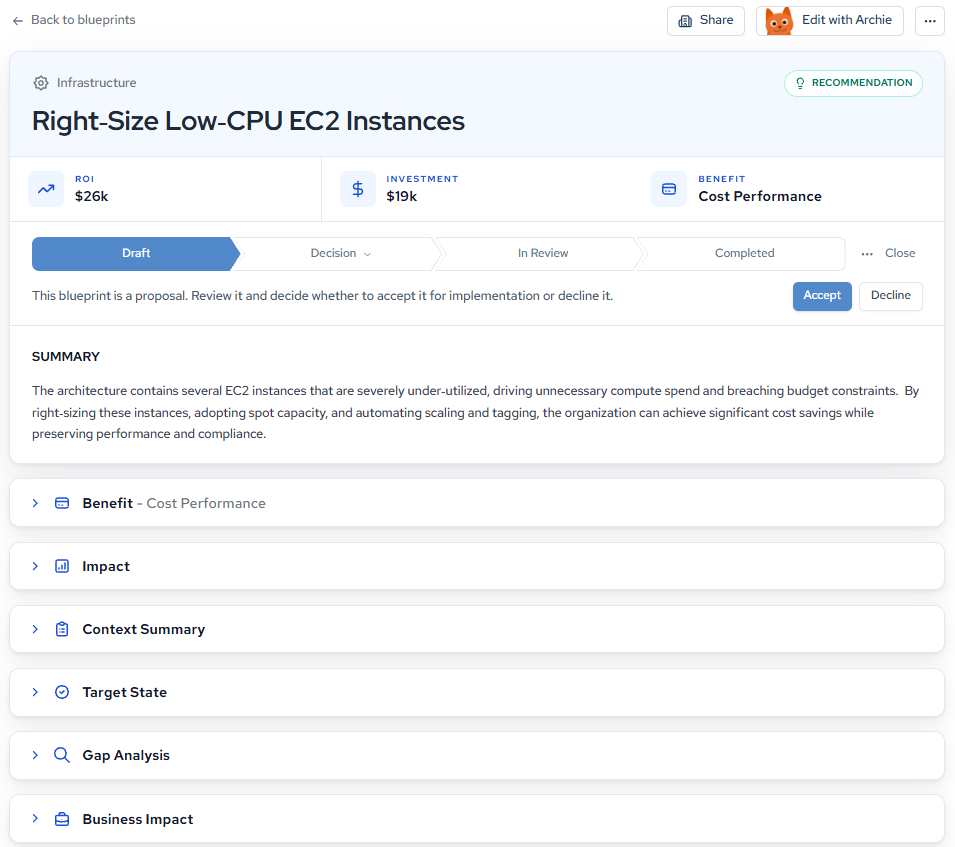
The sections you will get back
| Section | Answers | Read it when |
|---|---|---|
| Summary | What is changing and why now | Always, first |
| Benefit | What category of value this delivers, with quantified entries | Building the case to a lead or a PM |
| Impact | What happens if you act, and if you do not | Deciding urgency |
| Context Summary | Which requirements, strategy, and governance drove this | Checking the Blueprint against organizational intent |
| Target State | The end-state architecture and key components | Defining "done" |
| Gap Analysis | Current state, affected components, gap domains with severity | Deciding whether the problem is real for you |
| Business Impact | ROI, investment, payback, success metrics | Prioritization and funding conversations |
| Implementation Plan | Phased steps with per-step complexity | Sequencing and estimating |
Citations appear throughout as references back to specific Context entries, and resolve_citations expands them. This is the mechanism that lets you ask "which requirement is this claim resting on?" and get a real answer instead of a paraphrase. It is the fastest way to sanity-check a Blueprint whose reasoning you do not yet trust.
Step 4: Review the business case
Why: Blueprints compete for the same engineering capacity. The business case is how you compare two credible options, and it is also the argument you will need to repeat to whoever owns the roadmap.
When: before you commit any capacity, and before you escalate.
For Blueprint <id>, summarize the benefit, the quantified impact, the ROI,
the required investment, and the payback period.
A worked example from a Recommendation titled Right-Size Low-CPU EC2 Instances (Infrastructure domain, Cost Performance benefit):
| Figure | Value |
|---|---|
| Total quantified benefits (3 yr) | $46,796 |
| Total ongoing costs (3 yr) | $1,800 |
| Net benefit (3 yr) | $44,996 |
| Initial investment | $19,400 |
| Payback period | ~15.5 months |
| 3-year net ROI | $25,596 |
| Complexity | Medium |
These figures belong to one workspace's Blueprint. Yours will differ.

Two things to understand about that ROI number before you use it.
It is an aggregate. A Blueprint contributes value across multiple benefit categories, and Catio sums them. A large figure might be mostly avoided compliance risk with a small amount of cost reduction. Those are not the same kind of money and they do not persuade the same stakeholder. Ask for the breakdown, and see ROI Filter for how the aggregate is composed:
Break down the ROI on Blueprint <id> by benefit category, and tell me which
entries are hard cost reduction versus avoided risk.
It is modelled from Context, not measured from your systems. A quantified productivity benefit built on an assumed hourly rate and an assumed effort baseline is legitimate and auditable through its citations, but it is an estimate. If the assumptions are wrong for your team, the ROI is wrong by the same factor. Interrogate it rather than accepting it:
For Blueprint <id>, list every assumption behind the quantified benefits, and
resolve the citations backing each one.
Step 5: Review the engineering case
Why: a strong business case on a problem you do not actually have is a trap. The Gap Analysis is where you find out whether the problem is real, and the Target State is where you find out whether "done" is defined well enough to build against.
When: always, and specifically before you accept an effort estimate.
Target State
Read the solution overview and key architectural components together, then apply three tests:
- Is "done" unambiguous? Two engineers reading the target state should build the same thing.
- Does every change earn its place? Each key component should map to a gap. A component with no corresponding gap is worth questioning.
- Is it feasible for your team? Compare it against your operational constraints, capacity, and deployment cadence, not against an ideal team.
A vague target state usually means thin Workspace Context, not a weak model. That is fixable: add the specific constraints (SLAs, compliance boundaries, service ownership) and regenerate. See Using Context Effectively.
Gap Analysis
The Gap Analysis has three parts that do different jobs. Current State Analysis is the evidence. Affected Components names the real resources that will change. Gap Domains rates each gap by severity.
From the same Recommendation:
| Domain | Gap | Severity |
|---|---|---|
| Scalability | No spot-instance integration limits cost-effective scaling for bursty workloads | High |
| Governance and Compliance | Inconsistent cost-center tagging prevents accurate budget tracking | High |
| Operational Visibility | No real-time CPU metrics in the architecture graph | High |
| Performance and Latency | No automated scaling leads to over-provisioned capacity | Medium |
| Reliability | Instances lack Auto Scaling group fallback | Medium |
| Maintainability | Manual right-size decisions increase operational overhead | Medium |
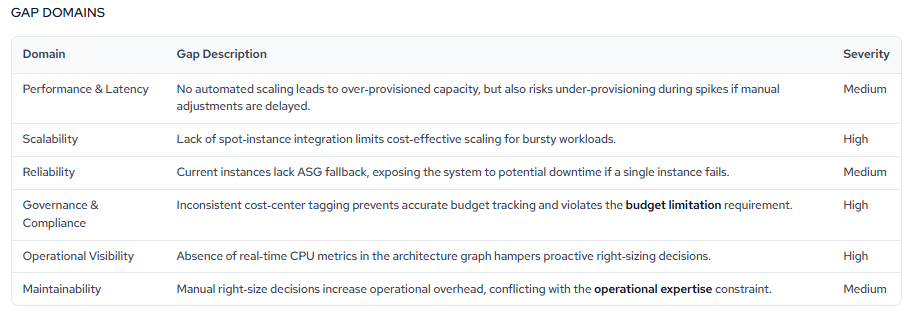
Three questions to put to it:
- Do these gaps match pain you already feel? Gaps tied to a known incident, an audit finding, or a cost overrun are the strongest candidates for immediate action. Gaps you have never noticed deserve more skepticism.
- Do you recognize the affected components? They should be resources your team actually owns, named by their real identifiers. If they are unfamiliar, your inventory or Context may be stale, and the Blueprint inherits that staleness.
- Is the severity real for you? A High in a domain you have already hardened carries less weight than a Medium in one you know is exposed.
This is also where your assistant earns its place. Ask it to reconcile the Blueprint against the code:
Read the relevant files in this repo and check the Gap Analysis in Blueprint
<id> against what is actually there. Flag anything the Blueprint asserts that
the code contradicts.
Blueprint content is generated from your Context and inventory, not read from your source code. Discrepancies are expected, and finding them early is the point. In the Generating Architecture-Aware Code walkthrough, the assistant caught a Redis dedup key that differed between the Blueprint and the repository because it read the code rather than trusting the description.
Step 6: Read the implementation plan
Why: this is the section that converts a decision into a schedule. It is also the section most likely to be misread as a runbook.
When: once the business and engineering cases both hold.
The plan is a dependency chain. Phases are ordered because earlier ones are prerequisites for later ones, each phase carries its own complexity rating, and each cites the Context entry it satisfies.
The Right-Size Low-CPU EC2 Instances plan runs seven steps:
- Ingest seven days of CloudWatch CPU metrics (Medium)
- Apply standardized cost-center tags via Terraform (Low)
- Create an Auto Scaling group with a target-tracking policy (Medium)
- Right-size instances to burstable types (Medium)
- Migrate eligible instances to Spot with On-Demand fallback (Medium)
- Update the CI/CD pipeline to enforce the new modules (Low)
- End-to-end validation with a rollback rehearsal (High)
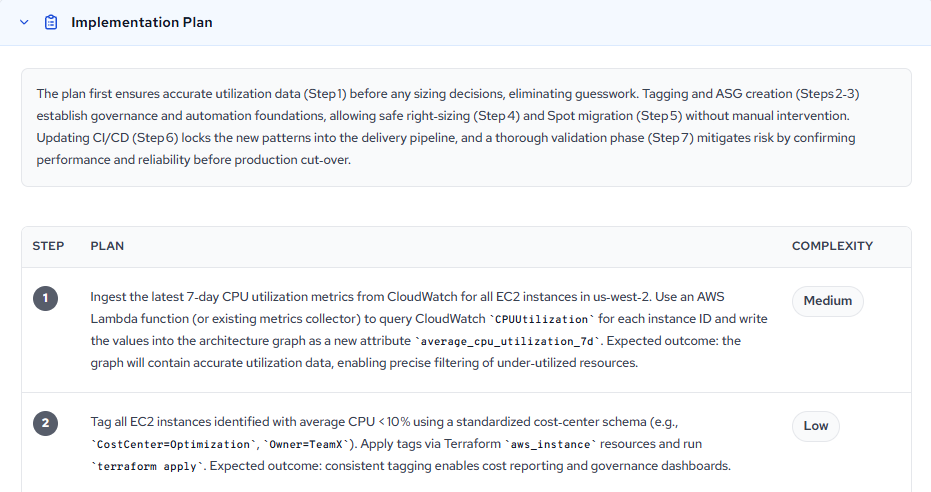
Note the shape of that sequence, because it generalizes: measure before you decide, establish governance and automation before you change anything, make the change, lock the new pattern into the pipeline, then validate hardest at the end.
Evaluate it with four questions:
- Does the sequencing hold? Confirm the early phases really are prerequisites.
- Does it fit how you ship? Validate each phase against your change-management process, sprint capacity, and deployment windows before scheduling.
- Is every phase justified? Citations trace each phase back to a requirement. A phase with no clear justification is worth challenging.
- Are there hidden prerequisites? A phase that depends on infrastructure your team does not yet manage is a separate project, not part of this one.
The plan is where MCP consumption pays off most directly, because you can put it against the repository immediately:
Map each phase in Blueprint <id> to the files and modules in this repo it
would touch. Flag any phase where the code does not yet have a seam for it.
Step 7: Decide priority
Why: you now have three independent readings and they will not always agree. This step turns them into one decision.
Score the Blueprint on four signals and let the combination decide:
| Signal | Strong | Weak |
|---|---|---|
| Gap resonance | Gaps tie to a known incident, audit finding, or cost overrun | Gaps you have never observed |
| Business case | Hard cost reduction, short payback, ROI robust to assumption changes | Aggregate dominated by avoided risk you already mitigate |
| Target clarity | Two engineers would build the same thing | Target state needs a design session first |
| Effort fit | Complexity Low to Medium, phases fit your sprint shape | High complexity, hidden prerequisites, or a one-way door |
The practical rules that fall out of it:
- Strong on all four: schedule it now.
- Strong gap, weak target clarity: refine the Blueprint before scheduling (Step 8). Do not implement against an ambiguous target state.
- Strong business case, weak gap resonance: the Context behind it is probably stale. Check the Context before you spend capacity.
- Strong everywhere but High complexity: add it to a Plan and sequence it deliberately.
- Weak gap resonance and weak business case: dismiss it, and say why. A dismissal with a reason is more useful to the next reader than a Blueprint left sitting at
NEW.
For Blueprint <id>, give me the complexity rating, the effort estimate,
the per-phase complexity, and the risks with their mitigations.
Step 8: Choose the next action
You have four routes. Pick by what the Blueprint is missing.
| Route | Use when | How |
|---|---|---|
| Implement now | Business case, engineering case, and plan all hold | Step 9 |
| Refine first | The Blueprint is right in direction but wrong in a specific | edit_blueprint_with_archie, then update_blueprint |
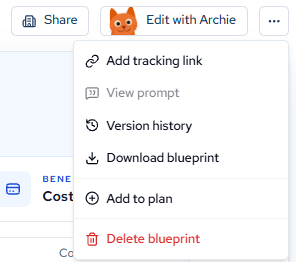
| Defer into a Plan | Correct and worth doing, not now | Add to plan from the Blueprint's more-actions menu in the app |
| Generate a better one | No Blueprint matches, or the existing one is superseded | ask_archie or the outline path |
Refining a Blueprint from your client
When a Blueprint is directionally right but misses a constraint you know about, refine it rather than mentally patching it. A mental patch does not survive the handoff to the next engineer.
Edit Blueprint <id> to add a dedicated dead-letter queue for notifications
that fail after three retries. Show me the edited draft before saving.
edit_blueprint_with_archie returns a processing token immediately. Poll get_archie_response every one to two seconds until the conversation completes. You get the edited Blueprint back as structured data with your changes applied.
Nothing is saved until you say so.
edit_blueprint_with_archiereturns a draft. Review it, then callupdate_blueprintto persist. If you skip that step, the refinement exists only in your session and the next engineer to pull the Blueprint will not see it.
Generating a Blueprint when none exists
If the search comes back empty, generate rather than improvise. Two paths.
The outline path, when you want a review gate before spending generation time:
- If you have a PRD or reference document, call
create_upload_url, PUT the bytes to the URL it returns, then callconfirm_upload. You get back a document reference. create_blueprint_outlinegenerates a reviewable outline (title, description, plan items) from your goal, optionally grounded by that document. This call is synchronous and can take up to around 25 seconds.refine_blueprint_outlineadjusts it. Each call returns a new revision and expects the current revision number.accept_blueprint_outlinestarts generation and returns a batch ID. Ordecline_blueprint_outlineto discard.- Poll
get_recommendation_list_statusuntil it reportsCOMPLETED, then fetch the generated Blueprints withget_recommendation.
The fast path: generate_blueprint_list triggers generation directly from a goal and skips the outline step. Use it when you already know what you want.
Upload this PRD and generate a Blueprint outline for extracting the
notifications domain into a Redis Streams async service.
Generation is asynchronous and can take minutes, so calibrate your expectations to that rather than to a normal tool call.
create_recommendation and create_design also exist, but they are for hand-authored Blueprints where you supply the content yourself. For generated Blueprints, use Archie or the outline path.
Step 9: Move into implementation
Why: the whole point of consuming a Blueprint in your client is that this step has no seam in it.
The division of labor is fixed:
| Component | Role |
|---|---|
| Catio MCP | Supplies architecture inventory, Workspace Context, and Blueprints |
| Your coding assistant | Writes the code |
| GitHub MCP or your VCS tooling | Opens the pull request |
The Catio MCP does not write or commit code. It supplies the architecture and the constraints. Your assistant reads the architecture from Catio, locates the matching seams in the repository, and writes code that honors both.
The sequence that works:
- Protect the baseline. Create an integration branch for the effort and route every change through a work branch that opens a PR into the integration branch, never directly into
main. - Map before you build. Have the assistant map each phase of the Blueprint to its exact location in code. This is the step that catches drift between the Blueprint and reality.
- Carry the constraints into the instruction. Name them explicitly rather than assuming the model retained them.
- Reference the Blueprint throughout. Keep the Blueprint ID in the conversation. When the assistant proposes something the Blueprint did not, that is a decision worth making consciously.
Create a work branch off notifications-extraction. Based on Blueprint <id> and
the repo conventions, implement the change and open a PR into
notifications-extraction, not main. Preserve the shared session factory, the
shared Redis client, and the env-based config. Use the repo's actual dedup key.
Do not rename it.
Grounding in the Blueprint is what changes the output:
| Decision | Grounded in your architecture | Generic boilerplate |
|---|---|---|
| Async transport | Reuses the Redis you already run | Introduces a message broker you do not run |
| Datastore | Writes to the existing Postgres | Spins up a new database |
| Dedup key | Uses the real key found in the repo | Invents a new key name |
| Shared infrastructure | Consumes the shared session factory and Redis client | Re-implements its own |
For the full walkthrough of this step, including branch structure and PR mechanics, see Generating Architecture-Aware Code with Catio MCP.
Done when
You have run this workflow successfully when all of the following are true:
- You know whether a Blueprint already exists for the change in front of you, without having opened the app.
- You can state the business case in one sentence, with the ROI broken down by benefit category and the assumptions behind it named.
- You have checked the Gap Analysis against the actual repository and know where the two disagree.
- You have made an explicit priority decision, including a decision to defer or dismiss, and the reason is recorded somewhere other than your memory.
- If you refined the Blueprint, the refinement is persisted, not just present in your session.
- Your implementation carries the Blueprint's constraints into the code, and the Blueprint ID is traceable from the pull request.
Best practices
- Establish context before you evaluate: pull
get_workspace_contextat the start. Reading a Blueprint's reasoning without the Context it was generated against is reading half the argument. - Search on nouns, filter on structure: free-text search finds candidates. Structured filters on domain, benefit, status, and subtype turn candidates into a shortlist.
- Never implement from a summary: always call
get_recommendationbefore you commit capacity. - Treat generated specifics as claims to verify: have your assistant read the code and reconcile. Every discrepancy you find before implementation is one you do not find in review.
- Read plans as sequencing, not as runbooks: phase ordering is the durable part. Specific commands and resource names need checking against your environment.
- Persist your refinements:
update_blueprintafteredit_blueprint_with_archie, every time. An unpersisted refinement is a decision the organization did not make. - Record dismissals with reasons: a Blueprint you ruled out is useful information. Set the status and say why.
- Start in conversation, persist in the modules: Archie is the day-to-day way in. Blueprints are where the work becomes durable.
Common workflows
| Situation | Sequence |
|---|---|
| Ticket lands, unclear if guidance exists | get_workspace_info, search_recommendations on the domain noun, get_recommendation |
| Sprint planning, need a shortlist | search_recommendations filtered to your domain and status NEW, sorted by ROI, then get_recommendation on the top three |
| Working through a generated batch | list_recommendation_lists, pick the batch, then get_recommendation per Blueprint |
| Building the case to a lead | get_recommendation, then resolve_citations on the benefit claims |
| Blueprint is close but wrong in a detail | edit_blueprint_with_archie, poll get_archie_response, review, update_blueprint |
| PRD in hand, no Blueprint yet | create_upload_url, confirm_upload, create_blueprint_outline, refine_blueprint_outline, accept_blueprint_outline, poll, get_recommendation |
| Ready to implement | get_recommendation, get_workspace_context, map to repo, implement, open PR |
Troubleshooting
- Search returns nothing but you know a Blueprint exists: you are almost certainly searching on a phrase. Reduce to the primary domain noun and retry.
- Tools return no data at all: confirm your workspace has data in the Catio console, and that you selected the right workspace at login. The workspace is fixed for the session; see Connecting to Multiple Workspaces.
- A batch shows
COMPLETEDbut the Blueprint looks empty: polling returns when the job finishes. Fetch the generated Blueprints separately withget_recommendation, using the IDs the batch produced. - Outline generation times out:
create_blueprint_outlineandrefine_blueprint_outlineare synchronous. If your client's per-call timeout is shorter than the call, retry; the call is idempotent for the same goal. base_revisionmismatch on refine: re-fetch the outline to get the current revision before refining.- Edit returns a token but the poll never completes: poll
get_archie_responseevery one to two seconds. A Blueprint ID that does not exist surfaces as an error through the poll, not a hang. confirm_uploadfails: PUT the file bytes to theupload_urlfromcreate_upload_urlbefore callingconfirm_upload, and within the expiry window.
For everything else, see Troubleshooting and Limitations.
FAQ
Do I need to know whether I want a Recommendation or a Design?
No. Filter by subtype when reading, not when asking.
Can I generate Blueprints from the MCP, or only read them?
Both. The MCP can create, generate, and update Blueprints. It cannot delete them. See Limitations.
Can anything I do over the MCP overwrite a Blueprint by accident?
Edits through Archie return drafts. Persisting requires an explicit update_blueprint call.
Can I attach a PRD at generation time?
Not inline in a prompt. Upload it with create_upload_url and confirm_upload and pass the resulting reference, or load it into Workspace Context first.
Why is the tool called search_recommendations when I am searching Blueprints?
The tool names predate the taxonomy that made Blueprint the umbrella term. The tools operate on all Blueprints regardless of subtype.
Can the Catio MCP write code or open a PR?
No. It supplies architecture, Context, and Blueprints. Your coding assistant writes the code and your VCS tooling opens the PR.
Related documentation
- Blueprints: the module, both subtypes, and the in-app experience
- Interpreting and Acting on Blueprints: reading the analytical sections critically, in the app
- How to Best Utilize Blueprints: the in-app review, refine, and organize loop
- Plans: organizing Blueprints into an ordered sequence
- Tools: the full MCP tool surface
- Query Your Architecture and Find Blueprints with the Catio MCP: the discovery guide this one follows
- Generating Architecture-Aware Code with Catio MCP: the implementation guide this one leads into
Updated 17 days ago