

Scope a Workspace
Tell Catio what a workspace covers and leaves out: company, objectives, systems, teams and boundaries.
A workspace's scope tells Catio what the workspace covers and what it leaves out: which company it is about, what it is for, which systems and teams are in it, and what must stay out of answers. Stacks, Blueprints, and Archie all read it to decide which components, teams, and goals are relevant.
Scope is the difference between an answer about your systems and an answer about systems in general. A workspace with its systems, teams, and boundaries filled in gets far fewer irrelevant results, because Catio is no longer guessing which part of your estate a question is about. For what a workspace is a boundary around, see What is a Workspace?.
Where to find it
Open the workspace, then click Scoping under Workspace in the left sidebar. You can also reach the same fields from Settings > Workspaces by selecting the workspace.
When you create a workspace, the setup dialog asks for the subject company, objectives, in-scope systems, and constraints (see Create a Workspace). The Scoping page shows these same fields, so you can review and refine scope from then on without reopening the setup dialog.
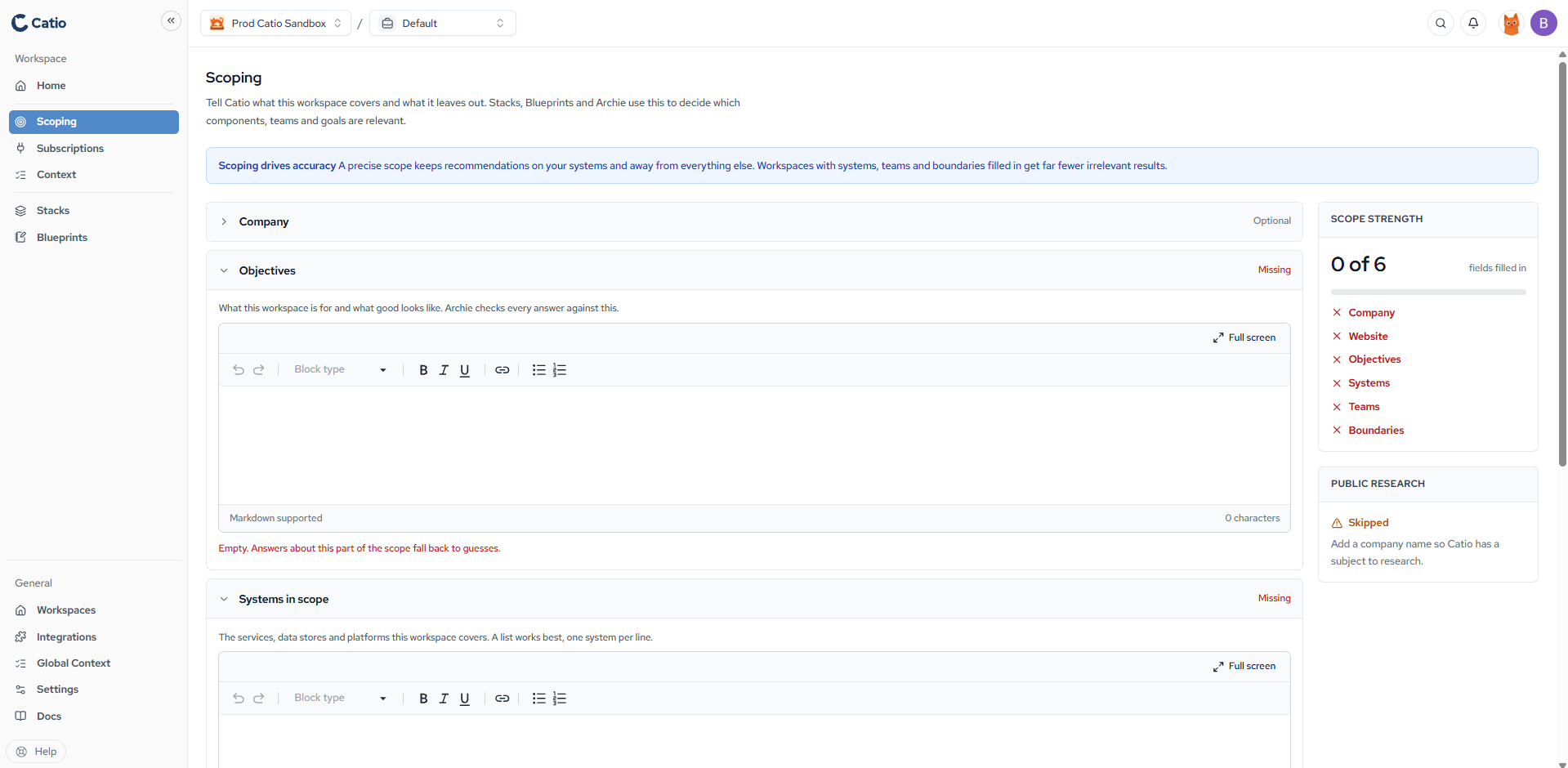
The scope fields
| Field | What it holds | Required |
|---|---|---|
| Company | The company this workspace is about. Usually your own; for a client, or a subsidiary or tenancy with its own name and website, that company | Optional |
| Website | The company's website, used to look up public facts about it | Optional |
| Objectives | What this workspace is for and what good looks like. Archie checks every answer against this | Recommended |
| Systems in scope | The services, data stores, and platforms the workspace covers. A list works best, one system per line | Recommended |
| Teams in scope | Whose work the workspace covers, so ownership and on-call questions get the right answer | Recommended |
| Boundaries | What to leave alone: systems, regions, vendors, or topics that must not appear in answers | Optional |
Objectives, systems, teams, and boundaries accept Markdown. A field left empty is marked Missing, and answers about that part of the scope fall back to guesses.
Scope strength
The Scope strength panel counts how many of the six fields are filled in and lists the ones still missing. Treat it as a checklist rather than a score to maximize: an honest one-line boundary is worth more than a padded paragraph.
Public research
When you name a company, Catio researches public facts about it, using the website to tell similarly named companies apart. The Public research panel shows the result. With no company named, research is skipped.
Writing scope that works
- Objectives: state the decision and the outcome, not the activity. "Cut run-rate on the payments platform by Q3 without touching checkout latency" scopes better than "optimize payments."
- Systems in scope: name real systems as your team refers to them, one per line, so they can be matched to what your integrations discover.
- Teams in scope: list the teams that own the systems above. Blueprints land better when Catio knows who would act on them.
- Boundaries: write down what is off-limits before someone asks about it: a vendor you are exiting, a region you do not operate in, a system another workspace owns.
Scope, Context, and views
Scope works like a high-level instruction file for the workspace, similar to a CLAUDE.md in a repository. It flows into Archie chats and into Blueprint generation, so Archie knows what the workspace is trying to achieve before you ask anything.
Scope is one of three ways to focus a workspace, and they work together. A new workspace needs Scoping, Subscriptions, and Context, which together produce its Stacks and Blueprints:
- Scope says what the workspace is about: its company, purpose, systems, teams, and limits.
- Workspace Context says what Catio optimizes for and steers by: requirements, strategy, policies, and standards. See Using Context Effectively.
- Views in Stacks narrow which parts of the architecture Catio evaluates for a specific question, without changing the workspace.
Done when
- Every field the workspace needs is filled in, and any left empty are empty on purpose.
- Someone outside the team could read the objectives and name the decision this workspace supports.
- The systems and teams listed match what the workspace's subscriptions bring in.
Next
Updated 9 days ago